Showing posts with label Internet Tricks. Show all posts

Saturday, 12 November 2016

How to Use Reliance Jio Sim in 3g Android Phone ?


Hello Guys , Today I'm Going to Tell the Trick to Use Reliance Jio Sim in 3g Android Phone. As we know that Reliance Jio Sim is supported only in 4g Phones. There are many people who don't have 4g Android Phone to Use Reliance Jio Sim. So I got a solution to use Reliance Jio 4g sim in 3g Android Phone. Lets follow the below steps to use Reliance Jio Sim in 3g Phone. 

Use Reliance Jio Sim in 3g Android Phone

How to Use Reliance Jio Sim in 3g Android Phone ?

If you want to use reliance jio sim in 3g then you need to follow some steps. You have to follow the steps according to your device type. If you are using MTK Device then you should follow the steps for that and if you are using other device then you should follow other steps. These steps may work for some devices and some may not work. It depends on device so try your luck. May be it will work on your device. So simply follow the below steps to use reliance jio sim in 3g android phone.

Also Read :- How to Generate Jio Barcode on Bluestacks or Rooted Android 3g/4g Phones ?

How to know if my handset is running on Mediatek chipset?

If you have a cellphone box then it will be mentioned there. Else, simply go to Gsmarena.com & check specifications of your phone. You will come to know whether you’re running on snapdragon or mediatek processor.

There’s also an alternate way. Just download CPU z app from google play store & it will give you complete details regarding your phone’s hardware & software.

Use Reliance Jio Sim in 3G Phone - Mediatek Devices

1] First of all, download & install MTK engineering mode on your device.
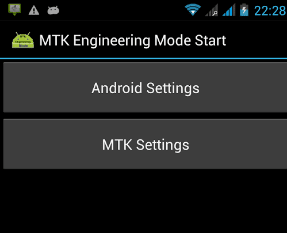
Use Reliance Jio Sim in 3g Android Phone 

2] You will 2 options. Click on ‘MTK settings’.

3] Tap on ‘preferred network’.

4] Now you have to select 4G LTE/WCDAMA/GSM option from the list. You can also choose LTE/GSM/CDMA auto (PRL) option.


5] Save everything & restart your phone.

6] Now it will show network on Jio sim.

7] Turn on data & enjoy unlimited 3G internet.

Note :- This trick might not work on Samsung devices.

Use Jio sim in 3G Android Phone with Xorware App


1] Download Xorware 2G/3G/4G interface pro & switcher apps. They are very small in size (less than 1 MB).

2] Now open Xorware interface app & it you will see something like this:


3] Change 2G & 3G network modes to 4G LTE as shown below:


4] Click on apply & restart your phone.

5] Now insert Jio sim & turn on phone.

6] If everything is fine then you will be able to use Jio’s internet.

Use Reliance Jio sim in 3G phones running on Qualcomm Snapdragon

It’s working on very few samsung phones which are using snapdragon processor. Might work on Xiaomi phones too.

  • Download mtk engineering mode app from play store.
  • Go to android settings (first option).
  • Select phone information 1.
  • Choose preferred network to LTE/GSM/CDMA.
  • Switch off phone & insert Jio sim in slot 1.
  • Turn on phone & you will see signals on Jio sim.

How to use Reliance Jio 4G sim in 3G phones such as Redmi, Micromax, Karbonn & LAVA


  • Open phone dialer & enter following code : *#*#4636#*#*
  • Now you will see 4 options.
  • Select phone information.
  • Set preferred network to LTE.

Alternate methods:

#1. You can buy some cheap 4G supported modems from Flipkart or any retail stores. Micromax & Huwawei are some good options to choose from. You can insert jio sim in it & enjoy 4G speed. Since these modems are already unlocked, you can use almost any sims. They cost anywhere between 1000 Rs to 2500 Rs.

#2. You can also go with JioFi but you won’t be able to use different sim other than Jio. It’s available for 1999 Rs & you also get ‘Jio preview offer’ with it. I recommend to go with this device as you get unlimited 4G without data capping. Also, you can use its hotspot & make calls from 2G/3G devices.

In this Article , We have shared the whole process to use Reliance Jio Sim inn 3g Android Phone. We hope you liked our article. If you are facing any problem , let me knowin comments. Don't forget to share this post.


Sunday, 30 October 2016

How to Generate JIO Barcode on Bluestacks or Rooted Phone ?

Hello Friends , Nowadays Everybody have the tendency to use internet with high speed connection. After the launching of Reliance Jio Sim Everybody is Crazy to get the Sim. It requires Bar Code to get the Free Reliance Jio Sim. But the problem is that the Jio barcode can be generated only in 4g smartphone. So , In this article I,m Gonna tell you the method to genertae jio barcode on bluestacks or rooted smartphone. There is no need of downloading 10-12 apps. So Lets follow the below steps to generate jio barcode on bluestacks or rooted phone. It has requirements to generate jio barcode on bluestacks or rooted phone which is given below :-


Requirements to Get JIO Barcode

  1. Rooted Android Phone or Rooted Bluestacks
  2. My JIO Modded App & CheatDroid App
  3. Snipping Tool

How to Generate JIO Barcode on Bluestacks Or Rooted Phone ?

  1. Open Bluestacks and install both CheatDroid Pro Apk & MyJio Modded App Apk.
  2. Now open MyJio Modded App and then open CheatDroid.
  3. Give CheatDroid Root Permission by clicking on Allow.
  4. In CheatDroid Apps List , Click On MyJio App.
  5. Then Click on DeviceInfo.xml
  6. Then Select The First Option.
  7. Here you need to edit 4 things which are I.M.E.I. number, Device ID, PhoneType and MAC address.
  8. Copy this IMEI number – 35987806049XXXX and replace XXXX with any 4 digit random number
  9. Add the same number for Device ID in between double quotes (" ")
  10. Now change number in MAC address with any different number. Even one number change will work.
  11. In place of GSM in Phone Type change it to LTE
  12. Then click on Save button.
  13. Now open MyJio Modded App and wait for banner to change in 2 seconds.
  14. You will see Get JIO SIM button in the banner. Click on that.
  15. Then you will see the offer screen and click on Agree & Get JIO Offer.
  16. Now choose your State and City and click on Next.
  17. Again click next and on the next page you will generate jio barcode
Important Note :- Reliance is currently generating 35xxx series of JIO codes so don't get triggered by same IMEI & barcode because in this trick the main motive is to check whether this Barcode is already redeemed or not. So by filling that we can get assured that this code is not yet used and we can grab this opportunity to get hand on to our free Jio sim.

How to Generate JIO Barcode Multiple Times ?

  1. Apply same steps as before from Step 6 to Step 12.
  2. Do not open MyJio app this time.
  3. Go to Settings and click on Apps or Manage Apps.
  4. Click on MyJio App and then click on Force Stop.
  5. Now go back and Apply same steps as before from Step 13 to Step 17.
So guys , In this article I have shared the method to generate jio barcode from bluestacks or rooted phone. I hope you liked this article and worked for you. You can get the free reliance jio sim till 31 december. f you are facing any problem while generating jio barcode , ask freely in comments below.

Saturday, 29 October 2016

Airtel Free Unlimited 3g Internet Trick - November 2016

If you are searching for Airtel Free Unlimited 3g Internet Trick - November 2016 , then you are at right place. Today I am going to Share The Best Airtel Free Unlimited 3g Internet Trick. Using 3g/4g Data Packs with High Speed is now became too costly. The Airtel Free 3g/4g Internet Trick has some requirements to get Free Unlimited 3g/4g Internet Speed. The Requirements For The Airtel Free Unlimited 3g Internet Trick - November  2016 is Given Below :- 

Airtel Free Unlimited  3g Internet Trick - November 2016

Requirements to Use Airtel Free Unlimited 3g Internet Trick 

  • You should have 3g enabled Airtel Sim Card. You can Activate 3g by dialing *121# From Your Airtel Sim.
  • Your Main Account Should Be to be safe.
  • Wynk Pack activated in Your Airtel SIM
  • APN- Airtelgprs.com
  • If you speed is capping Then Use Small 3G pack
  • Droid Vpn App- Click Here to Download

How to Use Airtel Free Unlimited 3g Internet Trick - November 2016


1. First of All Download Wynk Android App - Download Wynk 
2. Install and Run The Application with a Active Data Pack which You got
3. Now Click on the My Account in Wynk App and Click on Try Free.
4. Click on Select Wynk Freedom Plan Which is Totally Free.
5. Download Tunnel Guru for PC or Droid VPN for Android.( Droid Vpn Link is Given above)
6. Connect Your Net with APN : airtelgprs.com
7. Open Tunnel Guru or PD Proxy and Go To Settings and Then Options.
8. Go To Advance Settings and FinD Parent Proxy.
9. Put Parent Proxy as a Put IP: 188.138.61.118 , Port: 3128
10. Now Click on Headers and Write as : Host: mo.wynk.in/X-Online-Host: mo.wynk.in
11. Now Connect it With TCP 443 Port.
That's it... You are now connected. Enjoy Airtel Free Unlimited 3g Internet Trick.
Note:- This Above Given Airtel Wynk Host Trick Is confirmed working in Delhi, Haryana  and North states of India.Try in your State and Comment whether its working for you or Not….If Its Not Working Then Try it with Delhi SIM Card.

Monday, 12 September 2016

How to Hack Wifi : Best Android App to Get Wifi Password

Hello Friends , Here I'm Tejasvi Singh With My New Latest Brand New Trick. In This Article I'm Going to Tell You The Simple  Trick to Hack Wifi Password Just By Using An Android App.


I have the best method to know any wifi password easily. by this method you can check the password of other city, state, country, content yes!. you can check there passwords also.

How? It is really very simple by the help of GPS. It is totally easy anyone can do it without doing huge practices.

I think everyone is aware about the advantages of using wifi I mean another person wifi without any problem. That time you can enjoy the high speed at free of cost. So, let’s start.

# Introduction For Nearby Wifi Hacking

I think you’ll know that there are huge number of wifi network nearby you but wait. What’s the problem of then. I know that they have password rare cases any wifi is running without any password.
So, if you need a password of any high speed wifi nearby you then just read this post carefully and enjoy the pure hacking with any high skill of hacking. you just need a little bit mind+our steps given below.


# Steps To Hack Wifi

1.Firstly you need to download –  Wifi Map App 
2. Now just install and open it.
3. Then navigate it by just using GPS or by searching your location.
4. Now wait a minute it start showing you all the high speed wifi nearby you.


# Start The Hacking Now

5. Just simply Tap on any wifi signal on your screen which near by you.
6. Yeah!! There password is on your screen. Trusted and best method always.
It is not a prank guys like other app when I listen about this app I also think that it was same but it is really cool and working. you can watch the video below for more help…


# Why Hack Wifi Or Use Someone Wifi Actually

Introduce I think human being found a thing help them more then water for subscribe. make them live more years as normal (may be). I know that you can guess it, yes it is the wifi.

We need internet everywhere because internet gives you a another world which is more better then real yes I think like that. Because there you can be a king or anything by just making your self more popular without corruption in real mean.

I don’t say that you need to do corruption for being popular in non-internet world. But, it’s just like a thought. So, there are many other famous reason to being connected with wifi.

Actually the best is the it allow you to be in a another world which connects you without reaching to anyone. There you can earn, invest, donate, take, gain, loss everything is there on internet.

So, what we need to being connect with it. It is the internet connection and If you are a hard user of internet like me we need a ton of internet GBs. which creates a bit problem in our finance now we have to manage it.


# For What? We Hack Wifi

We don’t have money we have finance problem we are not bill gates or anyone like too much rich. We are common peoples maybe in future we are more then them. So, now it’s hero time don’t underestimate the power of a common man?

What we do to use internet without investing our money??

We try to find some ways to use anyone else internet. But, please be sure don’t waste someone data in download or doing stupid things. Now we go for wifi finding.

What we get?


Actually all are locked with password. Omg! Now what to do let’s go to 🙂 Qtricks.in
There you find the solution for using a high speed wifi nearby you now just note the password and go there. Now, do the things like education and low consumption data things because that data matter for the owner.
Now, you just hack the wifi use it but not to harm anyone.

# What We Do After Getting Someone Wifi Password

We just open browser start searching for movies, software, games and songs in HD. we never open any other thing which good for us we always find entertainment everywhere.
Then we just download too much things and suddenly the owner came to know and change the password and now we just sitting and waiting for it.
We have to change this thing because anyone can give wifi password. there is no need to hack anyone wifi you can ask them.
But, we have to make them sure we use data as only that actually we needed and never ever waste it. Then trust me you got the password easily without doing anything to hack wifi and all that.

#Thing Which is Matter When Using Wifi

Stop watching stupid things. I know you got it and stop download and all just read and use anyone wifi normally. Just use it for reading something new that helps you for getting job and all rather then wasting your time.
Just use it for low data consumption purposes only. there should be no need to use it too much. Just do surfing the internet.

So, that’s something you needs to keep in mind before hacking and after hacking means getting the password of any wifi network nearby you.
I am happy if you give you response below in comment box and suggest us your ideas on which we can make a new post. Tell us about our this how to hack wifi massive article.